
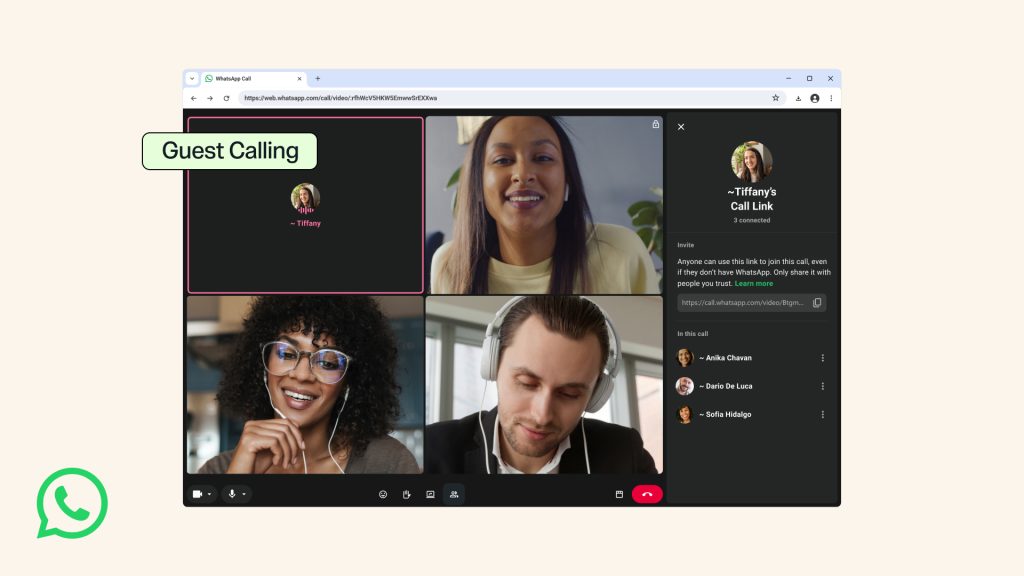
Do you want to make a video call with someone who doesn't use WhatsApp? Thanks to a major update to the app, the other person can now join without installing WhatsApp or creating an account. All you have to do is send them an invitation link.
Meta officially announced the new Guest Calling feature on October 14, 2026. It’s designed for friends, family members, students, parents, and professionals who want to communicate without everyone having to use the same app.
How to make a WhatsApp call with someone who doesn’t have an account
The person initiating the call must have a WhatsApp account. According to the official instructions, the process is as follows:
- Open WhatsApp on your phone.
- Go to the Calls tab.
- Tap the + icon and select “Create Call Link.”
- Send the link to the person you want to call, even if they don’t have WhatsApp.
- The invitee opens the link in their computer’s browser, enters a name, and requests to join.
- You approve their request, and the conversation begins.
Important: You need a WhatsApp account to create the link. Without an account, the guest can join but cannot start the call on their own.
How many people can join, and how much does it cost?
The feature supports one-on-one and group calls with up to 32 people. According to WhatsApp’s announcement, calls are free, feature end-to-end encryption, and have no time limit within the app. Of course, an internet connection is required, and data charges may apply depending on your plan.
Guests can share their computer screen, use reactions, and virtually raise their hand to ask a question.
Can anyone with the link join?
Not automatically. Each guest first enters a waiting room and is admitted only after being approved by the host. The host can remove participants during the call.
Additionally, those participating as guests cannot see the phone numbers of other participants, cannot send messages during the call, and cannot add other participants.
For your own safety, do not share the call link publicly, and be careful who you approve: the name a guest enters is not proof of their identity.
Don’t see this option yet?
This feature is rolling out gradually. If it doesn’t appear in your app, first check for a WhatsApp update on Google Play or the App Store. Its appearance may vary depending on the account, the app version, and the rollout phase.
Meta also announced that it plans to integrate with Google Calendar and Outlook in 2026, so that WhatsApp call links can be added to calendar invitations. This integration is a future feature, not a requirement for current calls.
What does this mean for our daily lives?
The change makes it easier to have a family chat, an online class, or a quick business meeting. You no longer need to ask every participant to install another app; all that’s required is for the host to have the feature enabled.
See also: “Vote for My Child”: The WhatsApp scam that could steal your account.
Source: Official Meta / WhatsApp announcement (October 14, 2026).